Licensing
Your key is the only credential
CoderCue has no accounts and no login. A licence key activates the app on your machine, and that is the whole system.
Activation
Activating takes about twenty seconds
Your key arrives by email the moment payment clears, sent to the address you used at checkout. It looks like a long block of letters and numbers.
Nothing arrived? Check the spam folder first, then ask in #licence-help in the Discord server with the invoice number and we will reissue it — or open a private ticket there if you would rather not post it publicly. Delivery is automatic, so a missing email is almost always a filter.
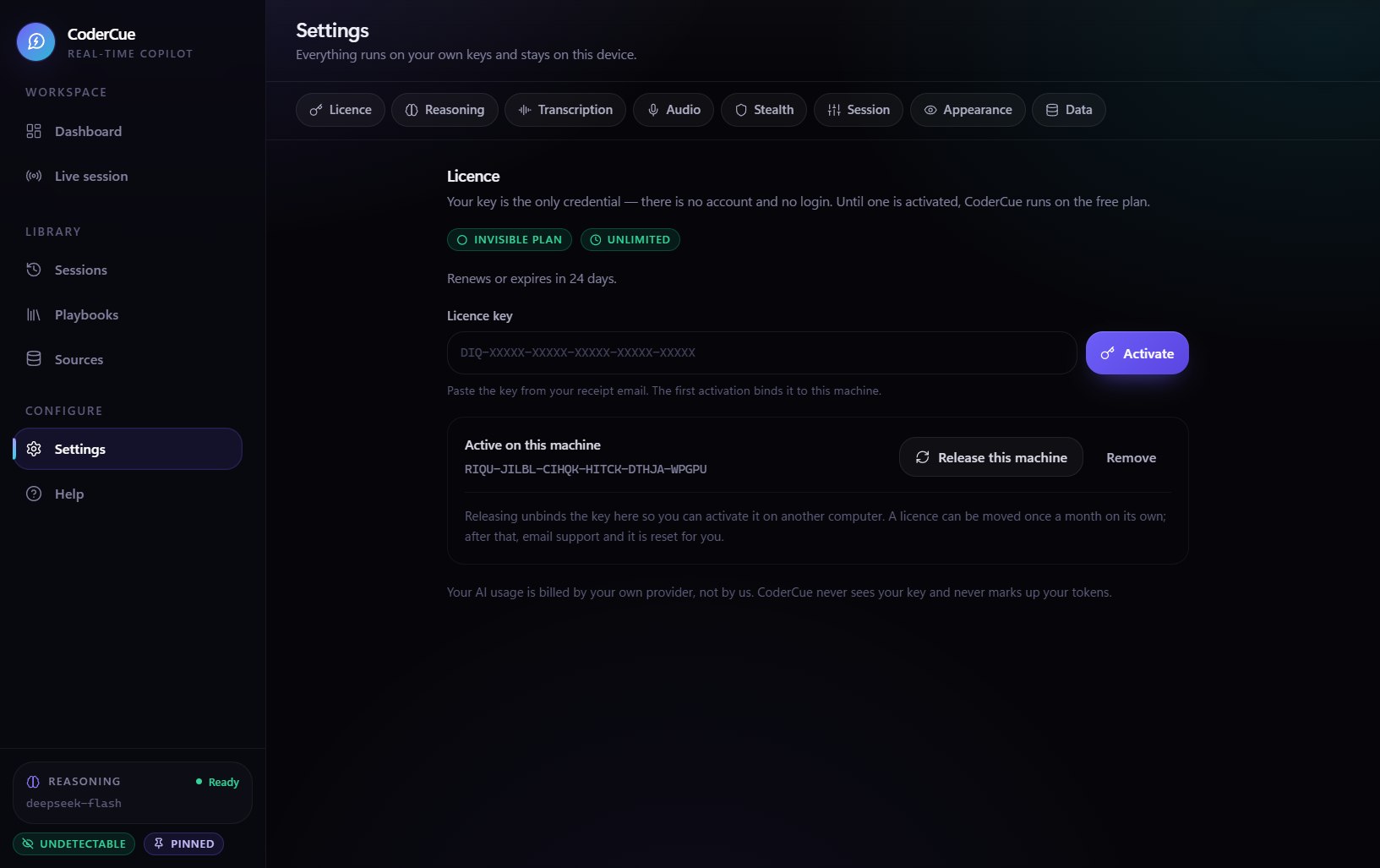
Open CoderCue and go to Settings
The licence section is at the top of the settings page, above the audio devices.
Paste your key and press Activate
Paste the whole key including any dashes. Trailing spaces from a copy are trimmed automatically.
The app confirms your plan
Standard or Invisible appears in the status line, and the plan name is shown on the session screen.
That is it, permanently
The entitlement is cached on the machine, so future launches do not need to reach the licence server.
Common situations
Moving, lapsing and replacing hardware
I bought a new PC
Install CoderCue on the new machine and activate the same key. If the old machine still holds the licence, release it from the licence section in Settings there. If you no longer have access to the old machine, email us and it is released for you — replacing hardware is expected and is never treated as abuse.
My licence expired
The app does not lock you out. It drops to the free plan, which keeps five minutes of live assistance a day, and everything you have already recorded stays readable. Buy another key whenever you want to carry on - the same machine keeps working and nothing is lost.
I am offline at a tournament
Your entitlement is cached locally and works for a grace period without reaching the licence server, because an interview should never stop because the venue wifi did. Transcription never needed the network at all.
My key was shared or leaked
Tell us and the key is revoked and reissued. A licence runs on one machine at a time, so a shared key stops working for whoever is using it rather than for you.
I want to switch plans
Upgrading from Standard to Invisible takes effect immediately. Downgrading takes effect at the end of the period you have already paid for, so you never lose time you paid for.
I bought a second key by mistake
Email us with both invoice numbers and the unused one is refunded and revoked. Nothing renews on its own here, so a second charge always means a second deliberate purchase.
Terms of the licence
What you are and are not buying
- A personal, non-transferable licence to run CoderCue on one machine at a time.
- Every update released during your licence term, at no extra cost.
- Your session history, knowledge sources and provider key, which are yours and remain on your machine.
- You are not buying the AI usage. That is billed to you directly by your own provider, at their rates.
- You are not buying the right to resell, sublicense or redistribute the app or your key.
- You are not buying permission to break your competition's rules. That part is on you.
Where to read the detail
- Terms of service — the agreement that governs your licence.
- Privacy policy — what the app does and does not do with your data.
- Refund policy — final sales, and what happens if something goes wrong.
Anything else: ask in the Discord server. A human reads every message, and for anything private you can open a ticket there instead of posting.
No key yet?
A licence is bought outright — no subscription, nothing renews, and sales are final. Start on the free plan and never enter a card if you would rather try it first.